
Websites for Home Watch Companies
Home Watch Website Design
Home watch customers are usually hundreds of miles away when they hire you. They can't meet you first, so your website does the job a handshake would: who you are, what you check, how you report back, and how you'd handle a problem.
What a home watch website needs
- Your visit checklist, written out (doors, windows, water, A/C, pests, mail, after-storm checks)
- How you report: photos, written reports, timing after each visit
- What happens when you find a problem, and who you call
- Insurance and any credentials you actually hold, stated plainly
- An easy way to reach you from out of state: email, phone, and a short contact form
What customers check before they call
- Exactly what you look at. An owner up north wants the checklist itself: running faucets, flushing toilets, reading the thermostat, looking under sinks. A vague promise to keep an eye on things reassures no one.
- How they’ll hear from you. They want to know if reports come by email, with photos, and how soon after the visit. Describe your real routine, not an ideal one.
- What you do when something’s wrong. A leak found on a Tuesday is the moment they hired you for. Explain who you call, whether you wait for their approval and how you keep them updated.
- Who holds their keys. Handing a house key to someone you’ve never met is a big ask. Your name, a photo of you and how you store keys and alarm codes help answer it.
- Proof of insurance. Absentee owners often ask about coverage before they sign. State the insurance and any credentials you actually hold, in plain words.
Pages and features to include
- Visit checklist. Your full interior and exterior routine, room by room, written the way you actually walk the house.
- Reports page. A sample report layout with placeholder photos, so owners see what will land in their inbox. Use a mock house, never a client’s.
- Storm and seasonal checks. What you do before and after a named storm, and how you open and close homes when owners arrive or leave for the season.
- Visit plans. Weekly, every other week or monthly visits, with what each includes. Add extras like vendor meetups or grocery stocking only if you offer them.
- About you. Owners can’t meet you in person, so a page with your photo, your background and why you started the business carries real weight.
- Contact for out-of-state owners. Email, phone and a short form that asks for the property address and the months they’re away. A client login for reports isn’t included but can be quoted.
Photos and credentials to gather
- A photo of you, the owner. People hiring from far away want a face to go with the name on each report.
- Shots from a sample visit. A thermostat reading, a dry cabinet under the sink and a locked lanai door show what a report looks like. Take them at your own home or a staged one.
- Your vehicle with signage. A marked car tells neighbors and gate staff that you belong there.
- Insurance certificate details. Have the carrier and coverage type ready so we state them accurately.
- Credentials you hold. List only the memberships or trainings you can show if a client asks.
- The towns and islands you cover. Owners of seasonal homes confirm their community is on your list before reading anything else.
A sample home watch homepage, top to bottom
- Hero: who you are, the communities you watch, and your phone and email
- Your visit checklist, inside and outside, in plain steps
- How reports arrive, with a sample report image
- What happens when you find a leak, power outage or storm damage
- Visit plans and the extra services you offer
- About the owner, with a photo and your insurance stated plainly
- Contact form asking for the property address and months away
Which design fits your home watch business
Steward Home Watch is the natural pick for most home watch businesses, since it is built around a visible check routine for owners who live far away. Coastal Premium fits a watch service in waterfront or island communities that wants bright photos of the homes and neighborhoods it covers. Luxury Service suits an owner who watches high-end estates and offers concierge-style extras, because its editorial type and generous spacing feel calm and discreet to clients used to private service.
Example design styles
We design your site for you. These samples use fictional businesses and show a few of the styles we build; tell us what you like when we talk. For real client work, see sites we’ve built.
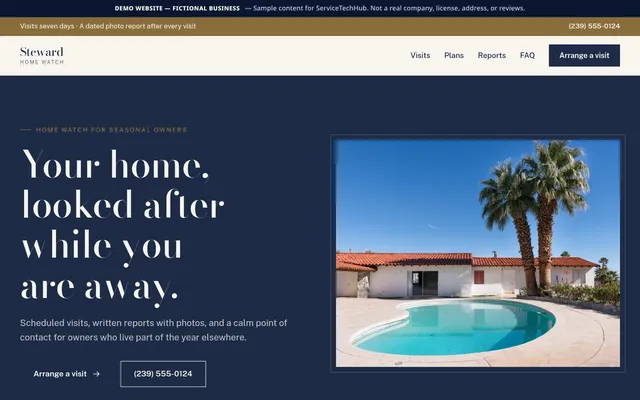 Steward Home WatchQuiet and trustworthy, made for absentee owners who want to see a clear check routine.
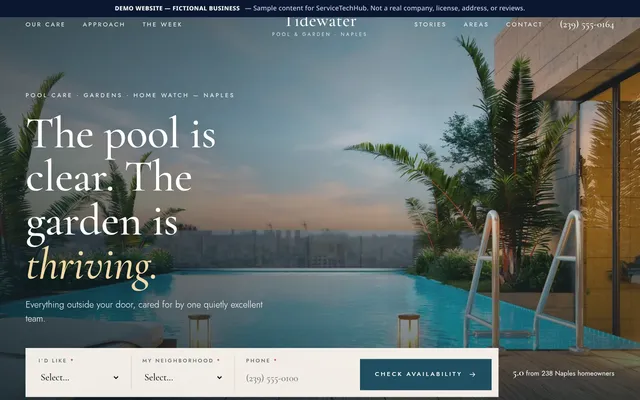 Coastal PremiumBright and airy, with room for large outdoor and pool photos.
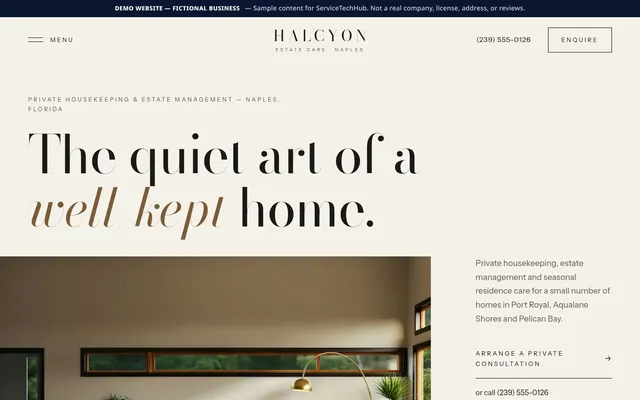 Luxury ServiceEditorial type and generous spacing for high-end service work.
Design previews use fictional businesses. Your site uses your own name, photos and details.
Already have a home watch website?
Move it instead of starting over: keep your domain, we design and rebuild it for you from your existing content, and hosting and technical upkeep are included in the monthly price. How switching works
In Florida
Many home watch customers live out of state and hire you based only on your website and a phone call. Be specific about what you check and how often, and list only the credentials and insurance you can show.
Common questions
Should I list my prices?
That's up to you. Many owners prefer listing what each visit includes and asking people to call for a quote, since homes vary.
Can I add a storm checklist?
Yes. A section on what you check after a named storm is useful to absentee owners. We write it from your actual routine.
Can I show a sample report without using a client’s home?
Yes. We build the sample from your own photos of a staged or personal property, or from placeholder images. No client address or interior appears on the site.
Can owners log in to see their reports?
Not on the standard plans. Most watch businesses email reports, and your site explains how that works. A login area can be quoted separately if you want one later.
Should my site mention how I handle keys and alarm codes?
We suggest it if you have a clear routine. Describe how you store keys and codes in general terms, leaving out anything that would help a stranger.
Is one page enough for a home watch business?
A Starter page can hold your checklist, how you report and a contact form. If you want separate pages for storm checks and an about page, the Business or Pro plan gives you room.
Where we build home watch websites
Home Watch websites in Georgia and South Carolina
Georgia
South Carolina
Call to get started, or check out online
Call (239) 210-5299 to get started, or check out online and we’ll contact you to collect your business info. Questions? Email hello@servicetechhub.com.